Vocal and instrumental separation
Separate the vocal from the instrumental part of an existing song and continue working with the generated tracks.
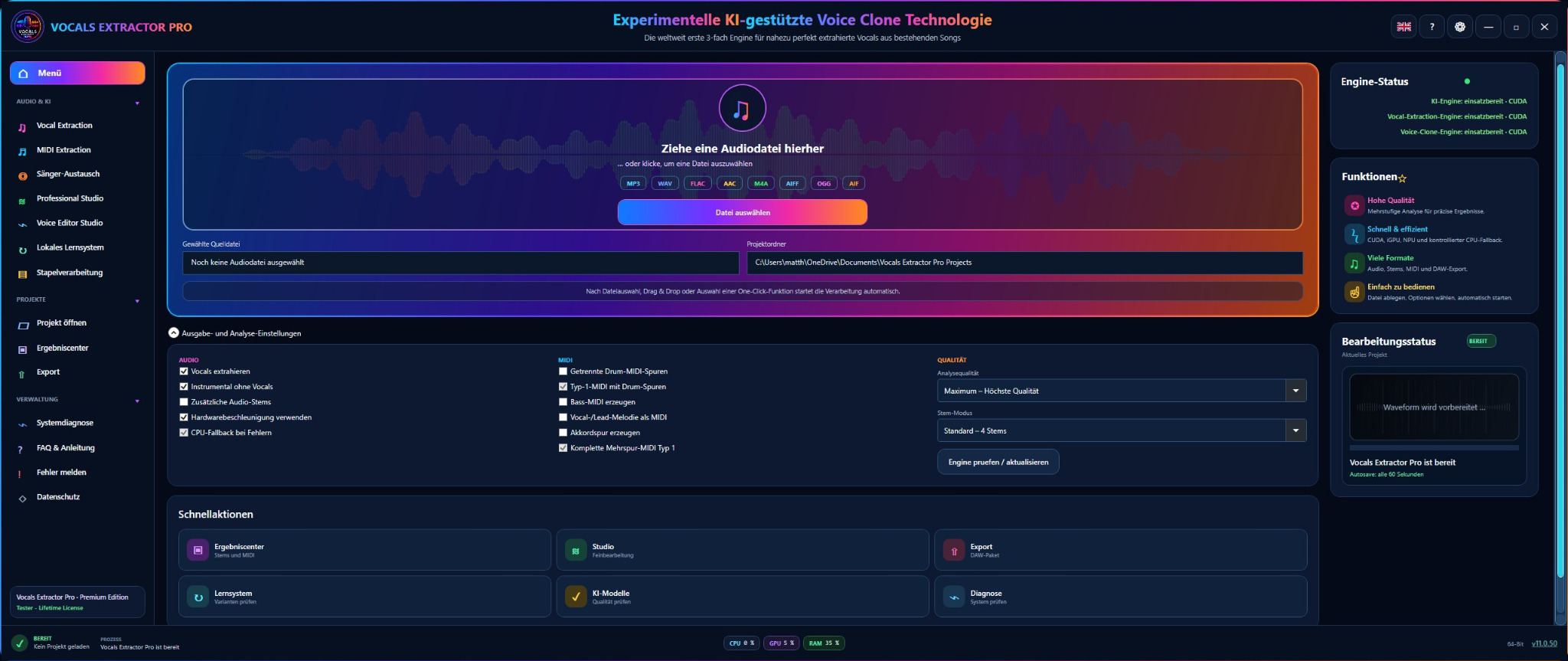
Vocals-Extractor-Pro extracts vocals and MIDI data, separates vocals from the instrumental and adds experimental voice-clone technology to the creative workflow — built for music production, remixes, cover productions and studios.
For music production software
This edition is exclusively a plugin for compatible digital audio workstations (DAWs), not a standalone application. The VST plugin has a reduced feature set compared with the full desktop application. For access to all features, please use the regular Vocals-Extractor-Pro desktop version.
Plugin for compatible Windows DAWs.
Included in Vocals Extractor Pro softwareVocal separation, MIDI and Voice Clone.
Vocal separation isolates the vocal from the instrumental. The software also generates MIDI data and provides experimental voice-clone workflows for further creative processing.
Separate the vocal from the instrumental part of an existing song and continue working with the generated tracks.
Isolate vocals and voices with multi-stage processing designed for clear and natural results.
Create an isolated vocal track for remixes, demos, analysis and creative audio projects.
Convert musical information into MIDI data and use it as a basis for arrangement, production or further editing.
Create experimental voice variations and combine extracted vocals with creative voice-clone workflows. This feature area is explicitly in an experimental stage of development.
Use your PC's processing power for audio, MIDI and voice-clone tools in an application optimized for Windows.
Experimental AI-assisted Voice Clone technology
Vocals-Extractor-Pro combines several workflow steps in one application: vocal and instrumental separation, MIDI extraction and an experimental voice-clone area. The extraction functions themselves are not presented as experimental MIDI extraction.
Hardware suitability check
The check only reads information provided by your browser and combines it with a few details you enter. Evaluation runs entirely locally in your browser.
Browsers cannot reliably read exact free disk space, graphics memory or NPU information. The check therefore combines automatically detectable values with a few quick details.
The result is guidance, not a performance guarantee. For privacy reasons, browsers sometimes provide reduced or imprecise hardware information.
Listen
Compare the original song, instrumental, extracted original vocal, experimental voice clone and the final duet. Below that, listen to selected MIDI extractions as rendered previews and download the actual MIDI files.
Switch between all five versions while playback continues. The playback position is preserved so differences can be heard immediately.
For the listening demo, the MIDI data was rendered with General MIDI instruments. The downloads below are the actual MIDI files generated by Vocals-Extractor-Pro.
Try it for free
The demo version is free. It lets you run several vocal extractions and evaluate the workflow, speed and output quality for yourself.
Only then decide whether a license — and which one — fits your use case.
Pricing and license options
Try Vocals-Extractor-Pro for free first, then choose the term that fits your needs. All paid options include Premium use on one device.
For a realistic quality test with your own audio material.
An affordable short-term license for individual projects and one intensive month.
For regular productions over a longer, clearly defined period.
A full year of Premium use for ongoing audio and music projects.
Permanent Premium use with no expiry date and no recurring cost.
The license is selected directly in the application after installation and is tied to the activated device.
Important note on copyright and artist rights
Vocals-Extractor-Pro provides a technical solution for separating vocals and voices from music. The software grants no rights to the original material or extracted components.
The user alone is responsible for checking and complying with copyright, neighboring rights and artist rights relating to the original material used. This applies in particular when extracted vocal tracks or other components are used in remixes, cover productions, releases, videos or public performances.
Before publication or commercial use, any required permissions and licenses must be obtained directly from the respective rights holders.
Frequently asked questions
Yes. You can download Vocals-Extractor-Pro for free and test it with several vocal extractions. This does not trigger any automatic paid renewal.
No. Depending on your choice, you pay a one-time fee of €3.99 for 1 month, €14.99 for 6 months, €19.99 for 12 months or €49.90 for the lifetime license. There is no automatic renewal.
The software combines vocal and instrumental separation with MIDI extraction and experimental voice-clone technology in one interface.
No. Quality depends on the source material, mix, compression, recording and instruments. With many suitable files, however, the multi-stage processing produces particularly clear vocals.
The software only performs the technical separation and does not grant usage rights. Users must determine whether and how extracted vocal tracks may be used in remixes, cover productions, videos or releases based on the copyright, artist and other rights applying to the original material, and must obtain any required permissions themselves.
We recommend 64-bit Windows 10 or 11, a recent multicore CPU, at least 16 GB RAM, a capable NVIDIA graphics card or alternatively a suitable AMD system with NPU support, plus at least about 20 GB of free storage. Use the Hardware suitability check for an initial assessment.
The provided x64 installer is intended for modern 64-bit Windows systems.
Ready to try it yourself?
Download the Vocals-Extractor-Pro demo, test vocal and MIDI extraction with your own material and only then decide whether you need a license.