Vocal and instrumental separation
Separate vocals from the instrumental part of an existing track and continue working with the resulting stems.
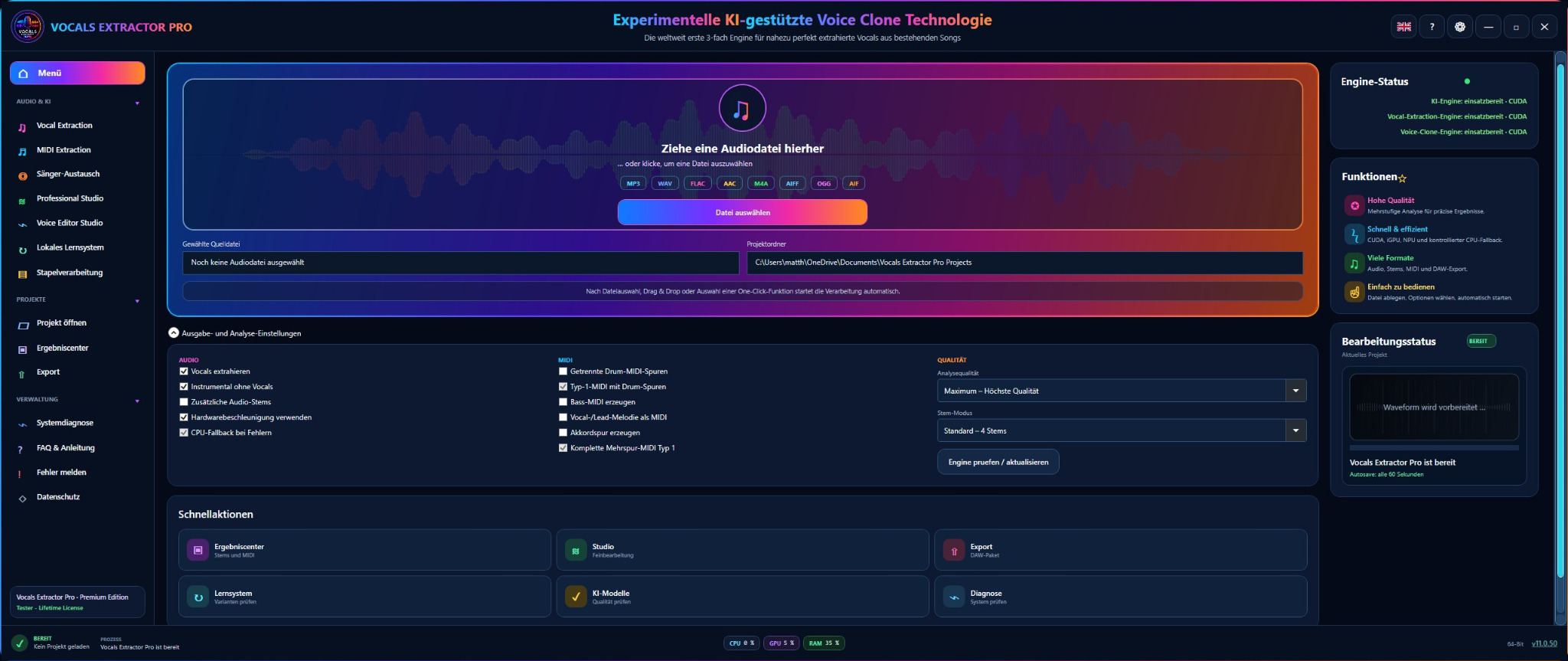
Vocals-Extractor-Pro extracts vocals and MIDI data, separates vocals from the instrumental track, and expands the creative workflow with experimental voice-cloning technology – developed for music production, remixes, cover versions, and recording studios.
Real audio comparison
The waveform of the original song is shown at the top. Below it, you can play Vocals Only, Instrumental and Voice Clone individually or combine any selected tracks in sync.
Select multiple tracks and start them together – for example Instrumental + Voice Clone or Instrumental + Vocals Only. All selected tracks run on the same audio timeline.
Vocal separation, MIDI, and voice cloning.
Vocal separation isolates the vocals from the instrumental track. The software also generates MIDI data and provides experimental voice-cloning workflows for further creative processing.
Separate vocals from the instrumental part of an existing track and continue working with the resulting stems.
Isolate singing and spoken voices using multi-stage processing designed to produce results that are as clear and natural as possible.
Create an isolated vocal track for remixes, demos, analysis, and creative audio projects.
Convert musical information into MIDI data and use it as a basis for arranging, production, or further editing.
Generate experimental voice variations and combine extracted vocals with creative voice-cloning workflows. This feature area is explicitly in an experimental stage of development.
Use your PC’s computing power for audio, MIDI, and voice-cloning tools in an application optimised for Windows.
Experimental AI-assisted voice-cloning technology
Vocals-Extractor-Pro combines several workflow steps in one application: vocal and instrumental separation, MIDI extraction, and an experimental voice-cloning section. The extraction functions themselves are not described as experimental MIDI extraction.
Hardware suitability test
The test reads only information made available by your browser and combines it with a few details supplied by you. The evaluation runs entirely locally in your browser.
Browsers cannot reliably read exact free disk space, dedicated video memory, or NPU capabilities. The test therefore combines automatically detectable values with a few short answers.
The result is a practical guide, not a performance guarantee. For privacy reasons, browsers may provide shortened or imprecise hardware information.
Try it for free
The demo version is free. You can use it to extract several vocal tracks and assess the interface, speed, and output quality for yourself.
Only then do you decide whether a licence is right for you and which option best fits your use case.
Prices and licence options
Try Vocals-Extractor-Pro free of charge first, then choose the term that matches your needs. Every paid option includes Premium use on one device.
For a realistic quality test using your own audio material.
The affordable short-term licence for individual projects and one intensive month.
For regular productions over a longer, clearly defined period.
A full year of Premium use for continuous audio and music projects.
Permanent Premium use with no expiry date and no recurring charges.
The licence is selected directly in the application after installation and is tied to the activated device.
Important notice regarding copyright and artists’ rights
Vocals-Extractor-Pro provides only a technical solution for separating vocals and voices from music. The software grants no rights to the original material or to any extracted components.
The user alone is responsible for checking and complying with copyright, neighbouring rights, performers’ rights, and all other rights relating to the original material. This applies in particular when extracted vocal tracks or other components are used in remixes, cover versions, releases, videos, or public performances.
Before publishing or using the material commercially, all required permissions and licences must be obtained directly from the respective rights holders.
Frequently asked questions
Yes. You can download Vocals-Extractor-Pro free of charge and test it with several vocal extractions. This does not trigger an automatic paid renewal.
No. No. You pay once: €4.99 for 1 month, €24.99 for 6 months, €39.99 for 12 months, or €49.99 for the lifetime licence. There is no automatic renewal.
The software combines vocal and instrumental separation, MIDI extraction, and experimental voice-cloning technology in a single interface.
No. Quality depends on the source material, mix, compression, recording, and included instruments. However, multi-stage processing produces particularly clear vocals for many suitable files.
The software performs only the technical separation and does not grant usage rights. The user must determine whether and how extracted vocal tracks may be used in remixes, cover versions, videos, or releases, taking into account copyright, artists’ rights, and all other rights relating to the original material, and must obtain all required permissions.
We recommend 64-bit Windows 10 or 11, a recent multicore CPU, at least 16 GB of RAM, a powerful NVIDIA graphics card or a suitable AMD system with NPU support, and approximately 20 GB of free storage. Use the hardware suitability test for an initial assessment.
The provided x64 installer is intended for modern 64-bit Windows systems.
Ready to test it yourself?
Download the Vocals-Extractor-Pro demo, test vocal and MIDI extraction using your own material, and decide on a licence only afterwards.